
Building NetSuite Automated Tests in Plain English
In AI and the Declining Cost of Trying, I wrote that AI agents make unfamiliar work more approachable. In that experiment, I used AI to help me write component tests. This time I wanted to find out if I could automate a third party application I knew nothing about.
By the end, I had a solid proof of concept built with Vibium, a test automation framework that was completely new to me. The surprising part wasn’t just the script worked, but that I didn’t have to learn Vibium to get there!
The backstory
There’s an ERP system called NetSuite that connects to FreightPOP. We also build an interface that lives within NetSuite so customers can use some of FreightPOP’s features without leaving NetSuite. I needed to know if it was possible to automate this interface for future versions.
I was looking for an excuse to try Vibium, so I installed it and booted up Claude Code. Then I started exploring NetSuite and its native version of FreightPOP.
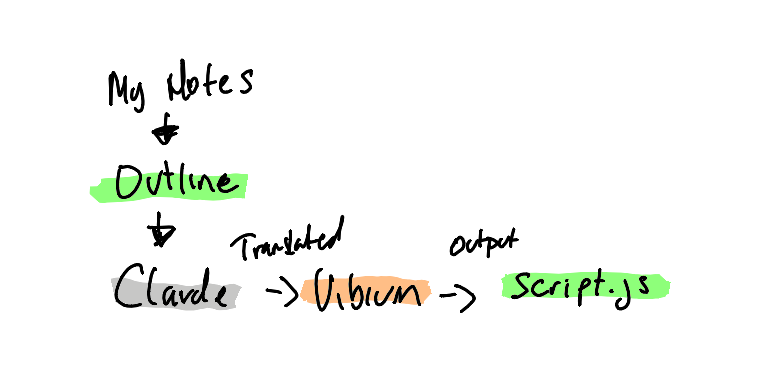
As I did this, I made an outline and gave it to Claude.
Handling two-factor authentication
Since NetSuite is a third party application, it’s not possible to completely disable two-factor authentication. If you disable one form of 2FA you get a different form. As a user, it’s easy to handle, but for a test automation script, it’s a bit more involved.
Fortunately, Mailinator’s authenticator feature solves the problem. I simply replaced my authenticator client in NetSuite with Mailinator’s and got access to the security code via a REST API call.
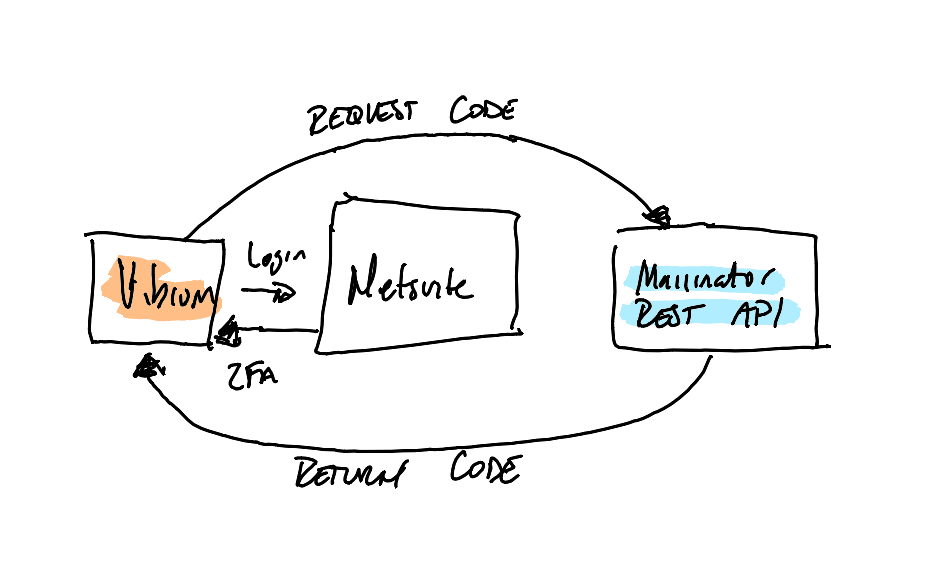
At this point, my outline looked like:
- Go to this <url> and login with this <email address> and <temp password>.
- After clicking login, fetch the 2FA code from this <url> and enter the value in the verification code box.
- Click Submit.
Explore it, automate it
Outside of the authentication detour, I spent most of my time in NetSuite, figuring out how to get a shipment quoting correctly. After I made progress, I’d throw notes of what I’d done into Claude and move on.
This “explore it and then automate it” concept is common. When I was an SDET and Test Automation Engineer, I’d find most of my bugs before writing any code. Exploring the application prior to automating is necessary. It allows you to identify shortcuts you can take or seams you can use.
When I was done, I asked Claude to turn those steps into a Vibium script. It did these things:
- Navigated to the NetSuite login page.
- Entered the credentials and logged in.
- Requested the two-factor authentication code from Mailinator.
- Entered and submitted the code.
- Waited for the NetSuite dashboard to load.
- Navigated to the Sales Order page.
- Selected a customer from a dropdown.
- Set shipment details and got a quote for it.
- Captured a screenshot for visual confirmation.
Faster but in English
I spent about 30 minutes exploring the application. It was fast because I was focused on understanding just a few workflows.
Once I was done, the script was a byproduct of my note taking. Outside of a few URLs, all my notes were in plain English.
When I was ready to try the script, I added my email address, real password, and Mailinator key to a .env file and had Claude run the script a handful of times. As with any UI automation, getting through the workflow once isn’t the same as having a reliable test.
I let Claude run the script and adjust waits and locators until it worked consistently. Then I ran the script myself just to make sure.
Shortcuts
This approach let me avoid a lot of extra work. I didn’t need to learn any Vibium syntax to write a script. That’s not bragging, nor am I suggesting someone shouldn’t learn Vibium. It’s just a factual statement. I knew Mailinator offered a feature to solve the 2FA problem, but again, I didn’t really have to implement it.
I also didn’t have to go back and write the script after figuring out the workflow. I generated it from the outline I had written. My experience kicked in when it came time to make sure I had a reliable script, but I still let the tools handle the timeouts and locators.
The best part of this approach was being able to learn only what I needed and let an automation script become the byproduct of that learning.
Member discussion